8. Tile maps
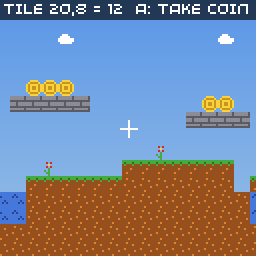
Levels in platformers, top-down adventures and puzzle games are usually grids of tiles. A TileMap stores a grid of sprite numbers and draws the visible part of it, scrolled, scaled or even rotated.
// Tile map: build a level from a spritesheet and scroll around it.
//
// A TileMap is a grid of sprite indices. Its width and height (in tiles)
// must be powers of two, and its spritesheet must be 128 pixels wide
// (16 sprites per row). Levels drawn in Tiled can be packed with
// assets.yml and loaded with TileMap::load_tmx() instead.
#include <cstring>

#include "32blit.hpp"
#include "assets.hpp"

using namespace blit;

// sprite indices in examples/shared/sprites.png
enum Tile : uint8_t {
  COIN = 4, GRASS = 8, DIRT = 9, BRICK = 10, WATER = 11, SKY = 12, FLOWER = 13, CLOUD = 15
};

constexpr int map_w = 32, map_h = 16; // in tiles, both powers of two

// The level as text, one character per tile. Easier to edit than numbers.
const char *level[map_h] = {
  "................................",
  "................................",
  "....c...........c.........c.....",
  "...........c....................",
  "................................",
  "..............$$$...............",
  ".............bbbbb.......$$.....",
  "........................bbbb....",
  ".....$$.........................",
  "....bbbb..............f.........",
  ".........f.....f....ggggggg.....",
  "gggggggggggg..ggggggddddddd.gggg",
  "ddddddddddddwwddddddddddddddwddd",
  "ddddddddddddwwddddddddddddddwddd",
  "dddddddddddddddddddddddddddddddd",
  "dddddddddddddddddddddddddddddddd",
};

uint8_t tiles[map_w * map_h];
TileMap *map = nullptr;
Surface *sheet = nullptr;

Vec2 camera(0, 0);

void init() {
  set_screen_mode(ScreenMode::hires);

  sheet = Surface::load(asset_sprites);
  screen.sprites = sheet;

  // turn the text into tile indices
  for(int y = 0; y < map_h; y++) {
    for(int x = 0; x < map_w; x++) {
      uint8_t t = SKY;
      switch(level[y][x]) {
        case 'g': t = GRASS; break;
        case 'd': t = DIRT; break;
        case 'b': t = BRICK; break;
        case 'w': t = WATER; break;
        case 'f': t = FLOWER; break;
        case 'c': t = CLOUD; break;
        case '$': t = COIN; break;
      }
      tiles[x + y * map_w] = t;
    }
  }

  // no per-tile transforms (nullptr), map size in tiles, and the spritesheet
  map = new TileMap(tiles, nullptr, Size(map_w, map_h), sheet);

  // SKY tiles are skipped when drawing, so the background shows through
  map->empty_tile_id = SKY;

  // wrap around horizontally when the camera goes past the edge
  map->repeat_mode = TileMap::REPEAT;
}

void update(uint32_t time) {
  if(buttons & Button::DPAD_LEFT)  camera.x -= 1.0f;
  if(buttons & Button::DPAD_RIGHT) camera.x += 1.0f;
  if(buttons & Button::DPAD_UP)    camera.y -= 1.0f;
  if(buttons & Button::DPAD_DOWN)  camera.y += 1.0f;

  camera.y = std::max(-32.0f, std::min(camera.y, float(map_h * 8 - 128)));

  // A collects the coin under the centre of the screen, if there is one
  if(buttons.pressed & Button::A) {
    Point centre = Point(camera + Vec2(64, 64)) / 8; // pixels to tiles
    int32_t index = map->offset(centre);
    if(index >= 0 && tiles[index] == COIN)
      tiles[index] = SKY;
  }
}

void render(uint32_t time) {
  // sky gradient behind the map
  for(int y = 0; y < 128; y++) {
    screen.pen = Pen(90 + y / 2, 150 + y / 3, 230);
    screen.h_span(Point(0, y), 128);
  }

  // the map's transform turns screen positions into map positions (in pixels),
  // so translating by the camera position scrolls the map
  map->transform = Mat3::translation(camera);
  map->draw(&screen, Rect(0, 0, 128, 128));

  // crosshair in the centre
  screen.pen = Pen(255, 255, 255);
  screen.h_span(Point(60, 64), 9);
  screen.v_span(Point(64, 60), 9);

  Point centre = Point(camera + Vec2(64, 64)) / 8;
  screen.pen = Pen(0, 0, 0, 160);
  screen.rectangle(Rect(0, 0, 128, 10));
  screen.pen = Pen(255, 255, 255);
  screen.text("tile " + std::to_string(centre.x) + "," + std::to_string(centre.y) +
              " = " + std::to_string(map->tile_at(centre)) + "  A: take coin", minimal_font, Point(2, 1));
}
Rules for tile maps
- The map's width and height, in tiles, must be powers of two: 8, 16, 32, 64, 128 and so on. The level in the example is 32×16.
- Each tile is one 8×8 sprite, and the tile's value is the sprite's number in the sheet.
- The spritesheet must be 128 pixels wide (16 sprites per row), because the map works out a tile's position in the sheet assuming 16 per row.
- Tile values are bytes, so a map can use up to 256 different tiles.
Building a map
A map needs an array of tile numbers, width × height long, arranged row by row:
The second argument is an optional array of per-tile transforms (flips and rotations), the same size as the tiles; nullptr means none. The map doesn't copy your arrays, so they must stay alive while it's used. Because it reads them directly, you can change a tile while the game runs just by writing to the array, as the example does when you take a coin.
Writing the level as text, with one character per tile, makes it much easier to see and edit than a list of numbers.
Drawing and scrolling
draw() fills the given rectangle of the screen with the map. For each pixel it works out which point of the map to show using transform, a Mat3 that turns screen positions into map positions (in pixels). Translating by the camera position scrolls; you can also scale and rotate:
// zoom in 2x around the camera, and rotate
map->transform = Mat3::translation(camera)
               * Mat3::translation(Vec2(64, 64))
               * Mat3::rotation(angle)
               * Mat3::scale(Vec2(0.5f, 0.5f))
               * Mat3::translation(Vec2(-64, -64));
Drawing works one scanline at a time, so draw() also accepts a function that returns a different transform for each line of the screen. That's how the classic "Mode 7" floor effects are made; see Tile maps and Mode 7.
Empty tiles and what's outside
- Tiles equal to
empty_tile_idaren't drawn, so whatever you drew first (a sky, a parallax background) shows through. repeat_modesays what to show beyond the map's edges:NONE(nothing, the default),REPEAT(wrap around),CLAMP_TO_EDGE(repeat the edge tiles) orDEFAULT_FILL(fill withdefault_tile_id).
Reading the map
To find what's at a position, divide pixels by 8 to get tiles:
tile_at() follows repeat_mode for positions outside the map, and returns 0 there when the mode is NONE. offset() gives the index into your tiles array, or -1 outside the map.
This is the basis of collision: before moving the player, check the tiles at the corners of where they would be, and don't move if any is solid.
Maps made in Tiled
For bigger levels, draw them in Tiled and let the asset pipeline pack them:
load_tmx() returns nullptr if the map isn't 8-bit or its size isn't a power of two. It copies the tiles into RAM by default so you can change them; pass 0 as the flags argument to use them straight from flash when the level never changes. Maps with several layers load one layer per TileMap, picked with the layer argument.
Try it
- Make the camera follow a player sprite that walks on the grass and can't walk through bricks.
- Add a second, slower-scrolling map behind the first for parallax.
- Add a
transformsarray and flip some flowers to make the level look less repetitive.
Next: make a complete game.