4. Text
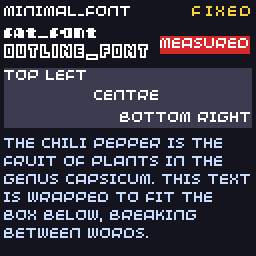
Scores, menus and dialogue all need text. The SDK has three built-in fonts and can measure, align and wrap text for you.
// Text: built-in fonts, alignment, measuring and wrapping.
#include "32blit.hpp"

using namespace blit;

const std::string story =
  "The chili pepper is the fruit of plants in the genus Capsicum. "
  "This text is wrapped to fit the box below, breaking between words.";

void init() {
  set_screen_mode(ScreenMode::hires);
}

void update(uint32_t time) {
}

void render(uint32_t time) {
  screen.pen = Pen(20, 20, 30);
  screen.clear();

  // the three built-in fonts
  screen.pen = Pen(255, 255, 255);
  screen.text("minimal_font", minimal_font, Point(2, 2));
  screen.text("fat_font", fat_font, Point(2, 12));
  screen.text("outline_font", outline_font, Point(2, 22));

  // variable = false uses the fixed character width, like a terminal
  screen.pen = Pen(250, 210, 60);
  screen.text("fixed", minimal_font, Point(126, 2), false, TextAlign::top_right);

  // alignment inside a rectangle
  Rect box(2, 34, 124, 30);
  screen.pen = Pen(60, 60, 80);
  screen.rectangle(box);
  screen.pen = Pen(255, 255, 255);
  screen.text("top left", minimal_font, box, true, TextAlign::top_left);
  screen.text("centre", minimal_font, box, true, TextAlign::center_center);
  screen.text("bottom right", minimal_font, box, true, TextAlign::bottom_right);

  // measure text to draw a background exactly behind it
  std::string label = "measured";
  Size size = screen.measure_text(label, minimal_font);
  screen.pen = Pen(214, 40, 40);
  screen.rectangle(Rect(Point(80, 18), size));
  screen.pen = Pen(255, 255, 255);
  screen.text(label, minimal_font, Point(80, 18));

  // wrap long text to a width, then draw it as several lines
  Rect para(2, 68, 124, 58);
  std::string wrapped = screen.wrap_text(story, para.w, minimal_font);
  screen.pen = Pen(200, 220, 255);
  screen.text(wrapped, minimal_font, para);
}
Drawing text
screen.pen = Pen(255, 255, 255);
screen.text("Score: " + std::to_string(score), minimal_font, Point(2, 2));
Text is drawn in the current pen colour, with its top-left corner at the point. Build strings with std::string and std::to_string(). A \n starts a new line.
Fonts
| Font | Looks like |
|---|---|
minimal_font |
thin capitals, the most compact |
fat_font |
bold, for titles and scores |
outline_font |
outlined capitals |
All three are 8 pixels tall; minimal_font and outline_font draw lower-case letters as capitals. You can make your own font from an image or a TrueType file with the asset pipeline and use it like the built-in ones:
Variable and fixed width
By default each character takes only as much space as it needs. Pass false as the fourth argument to give every character the same width, so columns of numbers line up:
Alignment
Pass a TextAlign to place text relative to a point or inside a rectangle:
// centred in the screen
screen.text("PAUSED", fat_font, Rect(0, 0, 128, 128), true, TextAlign::center_center);

// right-aligned to a point: the text ends at x = 126
screen.text("999", minimal_font, Point(126, 2), true, TextAlign::top_right);
The horizontal choices are left, center_h and right, the vertical ones top, center_v and bottom, and the combinations are named top_left, center_center, bottom_right and so on.
Measuring
measure_text() returns the Size text would take, without drawing it. Use it to draw a box behind a label, or to centre something next to it:
Size size = screen.measure_text("measured", minimal_font);
screen.pen = Pen(214, 40, 40);
screen.rectangle(Rect(Point(80, 18), size));
Wrapping
wrap_text() inserts line breaks so text fits a width, breaking between words. Draw the result into a rectangle:
std::string wrapped = screen.wrap_text(story, 124, minimal_font);
screen.text(wrapped, minimal_font, Rect(2, 68, 124, 58));
Wrapping takes some work, so for text that doesn't change, wrap it once (in init() or when it changes) and keep the result.
Try it
- Show a score in the top-right corner that stays right-aligned as it grows.
- Make a dialogue box: a rectangle along the bottom with wrapped text that appears one character at a time (draw
wrapped.substr(0, n)and increaseninupdate()).
Next: sound.