5. Sound
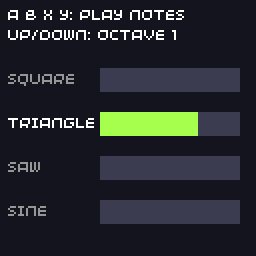
The SDK has a built-in synthesiser with 8 channels. Each channel plays a note with a waveform and an envelope, which is plenty for sound effects and chiptune music. Channels can also play WAV and MP3 files.
// Audio: play notes on the synth channels.
//
// A, B, X and Y each play a note with a different waveform. Up and down
// change the octave.
#include "32blit.hpp"

using namespace blit;

const char *wave_names[] = {"Square", "Triangle", "Saw", "Sine"};
int octave = 0;
int last_channel = -1;

void init() {
  set_screen_mode(ScreenMode::hires);

  // channel 0: a short square-wave beep
  channels[0].waveforms = Waveform::SQUARE;
  channels[0].attack_ms = 5;
  channels[0].decay_ms = 100;
  channels[0].sustain = 0;   // no sustain, so the note ends by itself
  channels[0].release_ms = 0;

  // channel 1: a soft triangle that holds while the button is held
  channels[1].waveforms = Waveform::TRIANGLE;
  channels[1].attack_ms = 30;
  channels[1].decay_ms = 200;
  channels[1].sustain = 0xafff;
  channels[1].release_ms = 300;

  // channel 2: a buzzy saw
  channels[2].waveforms = Waveform::SAW;
  channels[2].attack_ms = 10;
  channels[2].decay_ms = 300;
  channels[2].sustain = 0x7fff;
  channels[2].release_ms = 100;

  // channel 3: a sine with a long release, like a bell
  channels[3].waveforms = Waveform::SINE;
  channels[3].attack_ms = 2;
  channels[3].decay_ms = 600;
  channels[3].sustain = 0;
  channels[3].release_ms = 600;
}

void play(int channel, uint16_t frequency) {
  channels[channel].frequency = frequency << octave;
  channels[channel].trigger_attack();
  last_channel = channel;
}

void update(uint32_t time) {
  const Button keys[] = {Button::A, Button::B, Button::X, Button::Y};
  const uint16_t notes[] = {262, 330, 392, 523}; // C4, E4, G4, C5

  for(int i = 0; i < 4; i++) {
    if(buttons.pressed & keys[i])
      play(i, notes[i]);

    // letting go moves a held note on to its release
    if(buttons.released & keys[i])
      channels[i].trigger_release();
  }

  if(buttons.pressed & Button::DPAD_UP)   octave = std::min(octave + 1, 2);
  if(buttons.pressed & Button::DPAD_DOWN) octave = std::max(octave - 1, 0);
}

void render(uint32_t time) {
  screen.pen = Pen(20, 20, 30);
  screen.clear();

  screen.pen = Pen(255, 255, 255);
  screen.text("A B X Y: play notes", minimal_font, Point(4, 4));
  screen.text("Up/Down: octave " + std::to_string(octave), minimal_font, Point(4, 14));

  // one bar per channel showing its envelope level
  for(int i = 0; i < 4; i++) {
    int y = 34 + i * 22;
    // adsr is the envelope level, 24-bit
    int level = channels[i].adsr >> 18; // 0..63
    if(channels[i].adsr_phase == ADSRPhase::OFF)
      level = 0;

    screen.pen = Pen(60, 60, 80);
    screen.rectangle(Rect(50, y, 70, 12));
    screen.pen = hsv_to_rgba(i / 4.0f, 0.7f, 1.0f);
    screen.rectangle(Rect(50, y, level + 6 * (level > 0), 12));

    screen.pen = i == last_channel ? Pen(255, 255, 255) : Pen(150, 150, 150);
    screen.text(wave_names[i], minimal_font, Point(4, y + 2));
  }
}
Channels
channels[0] to channels[7] are the eight voices. Each one is an AudioChannel that you set up once, usually in init(), then trigger whenever you want a sound:
channels[0].waveforms = Waveform::SQUARE;
channels[0].frequency = 880;     // Hz
channels[0].trigger_attack();    // start the note
Waveforms
| Waveform | Sound |
|---|---|
SQUARE |
hollow and buzzy, the classic chiptune sound; pulse_width changes its tone |
TRIANGLE |
soft and flute-like |
SAW |
bright and harsh |
SINE |
pure and smooth |
NOISE |
hiss, for explosions, drums and wind |
WAVE |
your own samples, from a callback (this is how WAV and MP3 playback work) |
They are bit flags, so you can mix several on one channel: Waveform::SQUARE | Waveform::NOISE.
Envelopes
Each note follows an ADSR envelope:
volume
  ▲     ┌─ decay
  │    /\
  │   /  \_________  ← sustain level
  │  /             \
  │ /               \  ← release
  └──────────────────────► time
   attack        trigger_release()
| Field | Meaning |
|---|---|
attack_ms |
time to rise to full volume |
decay_ms |
time to fall to the sustain level |
sustain |
the level held until the note is released, 0 to 0xffff |
release_ms |
time to fade to silence after trigger_release() |
- For sound effects that end by themselves, set
sustain = 0. The note rises, decays to silence and stops; you never need to release it. - For held notes, set a sustain level, call
trigger_attack()when the note starts andtrigger_release()when it ends.
channels[n].volume sets a channel's loudness (0 to 0xffff). The player's volume setting on the console is applied on top, so leave room in your mix rather than turning everything up to full.
Sound effects
A small function that sets a frequency and triggers is all most games need:
void play(int channel, uint16_t frequency) {
  channels[channel].frequency = frequency;
  channels[channel].trigger_attack();
}

// a coin pickup: a short high blip
play(0, 1320);
Give each kind of sound its own channel so a new explosion doesn't cut off the coin sound. For a rising or falling effect, change frequency in update() while the note plays.
Music files
WavStream and MP3Stream play a file on one channel, reading it a little at a time.
- WAV files must be uncompressed PCM, mono, at 22 050 or 11 025 Hz.
- MP3 files are best at 22 050 Hz mono; other rates and stereo are converted, but roughly.
The simplest way to ship music is to pack the file into your game as raw data and register it as an in-memory file:
#include "assets.hpp"

MP3Stream music;

void init() {
  File::add_buffer_file("music.mp3", asset_music, asset_music_length);
  music.load("music.mp3");
  music.play(7, MP3Stream::loop);  // loop on channel 7
}

void update(uint32_t time) {
  music.update();  // keep the decoder fed
}
Call update() on the stream every update: it decodes the next part of the file. MP3 decoding takes noticeable CPU time on the console, so prefer WAV (or the synthesiser) when a game is short of time, and keep files small: they count towards the 12 MB of flash for games. See Audio.
Try it
- Add a fifth note on MENU with
Waveform::NOISEas a drum. - Make a "power up" sound: start at 400 Hz and raise
frequencyby 20 every update for half a second. - Play a short tune by stepping through an array of notes with a Timer.
Next: saving progress.