7. Timers, tweens and particles
Games are full of things that happen over time: a power-up that runs out, a menu that slides in, sparks that fly and fade. The SDK has three helpers for these.
Timers
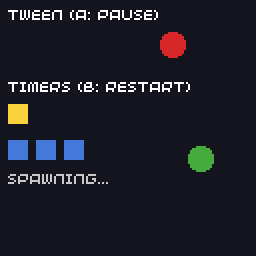
A Timer calls a function after a delay, once, a set number of times, or forever:
Timer blink_timer;

void blink(Timer &timer) {
  blink_on = !blink_on;
}

void init() {
  blink_timer.init(blink, 500, -1);   // every 500 ms, forever
  blink_timer.start();
}
The arguments to init() are the callback, the interval in milliseconds, and how many times to fire (-1 for forever). The engine checks running timers before each frame and calls the callback when one is due; you don't need to update them yourself.
| Call | Effect |
|---|---|
start() |
start, or resume after pause() |
pause() |
stop counting; start() carries on from where it was |
stop() |
stop; start() begins again from zero |
is_running(), is_paused(), is_stopped(), is_finished() |
check the state |
timer.loop_count counts how many times it has fired. A timer with a set number of loops ends up is_finished().
Timers must outlive their use
The engine keeps a pointer to each started timer, so make timers global variables or members of objects that live as long as they run. A timer destroyed while running is removed safely, but a local Timer in a function stops as soon as the function returns.
Tweens
A Tween moves a number from one value to another over a duration, following a curve. Read tween.value whenever you need it:
Tween slide;

void init() {
  slide.init(tween_ease_in_out_quad, 0.0f, 100.0f, 2000, -1);
  slide.start();
}

void render(uint32_t time) {
  screen.circle(Point(14 + int(slide.value), 22), 6);
}
The arguments are the curve, the start and end values, the duration in milliseconds, and the number of loops (-1 repeats forever, 1 runs once). Tweens have the same start(), pause(), stop() and is_...() calls as timers.
| Curve | Shape |
|---|---|
tween_linear |
constant speed |
tween_ease_in_quad |
starts fast and slows down to the end value |
tween_ease_out_quad |
starts slowly and speeds up |
tween_ease_in_out_quad |
slow at both ends, fast in the middle |
tween_sine |
starts at the end value, swings to the start value and back once per loop: good for bobbing and pulsing |
(The two one-sided quad curves are named the opposite way round from the usual easing names. The table describes what they actually do.)
You can write your own curve: any function float f(uint32_t t, float from, float to, uint32_t duration) that returns from at t = 0 and to at t = duration.
Here is the example that shows timers and tweens together:
// Timers and tweens.
//
// A Timer calls a function after a delay, optionally repeating. A Tween
// moves a value from one number to another over time along a curve. Both
// are updated by the engine, you only start them.
#include "32blit.hpp"

using namespace blit;

Timer blink_timer;
Timer spawn_timer;
Tween slide;
Tween bounce;

bool blink_on = true;
int spawned = 0;

void blink(Timer &timer) {
  blink_on = !blink_on;
}

void spawn(Timer &timer) {
  spawned++;
  // timer.loop_count counts how many times it has fired
}

void init() {
  set_screen_mode(ScreenMode::hires);

  // fire every 500 ms, forever (loops = -1)
  blink_timer.init(blink, 500, -1);
  blink_timer.start();

  // fire every second, five times, then stop
  spawn_timer.init(spawn, 1000, 5);
  spawn_timer.start();

  // 0 to 100 over 2 seconds, repeating
  slide.init(tween_ease_in_out_quad, 0.0f, 100.0f, 2000, -1);
  slide.start();

  // a sine wave between 20 and 60, one cycle per 1.5 seconds
  bounce.init(tween_sine, 20.0f, 60.0f, 1500, -1);
  bounce.start();
}

void update(uint32_t time) {
  // A pauses and resumes the slide
  if(buttons.pressed & Button::A) {
    if(slide.is_running())
      slide.pause();
    else
      slide.start();
  }

  // B restarts the spawn timer
  if(buttons.pressed & Button::B) {
    spawned = 0;
    spawn_timer.stop();
    spawn_timer.start();
  }
}

void render(uint32_t time) {
  screen.pen = Pen(20, 20, 30);
  screen.clear();

  screen.pen = Pen(255, 255, 255);
  screen.text("Tween (A: pause)", minimal_font, Point(4, 4));
  screen.pen = Pen(214, 40, 40);
  screen.circle(Point(14 + int(slide.value), 22), 6);

  screen.pen = Pen(70, 170, 60);
  screen.circle(Point(100, 30 + int(bounce.value)), 6);

  screen.pen = Pen(255, 255, 255);
  screen.text("Timers (B: restart)", minimal_font, Point(4, 40));
  if(blink_on) {
    screen.pen = Pen(250, 210, 60);
    screen.rectangle(Rect(4, 52, 10, 10));
  }

  screen.pen = Pen(70, 120, 220);
  for(int i = 0; i < spawned; i++)
    screen.rectangle(Rect(4 + i * 14, 70, 10, 10));

  screen.pen = Pen(200, 200, 200);
  screen.text(spawn_timer.is_finished() ? "spawn timer finished" : "spawning...", minimal_font, Point(4, 86));
}
Particles
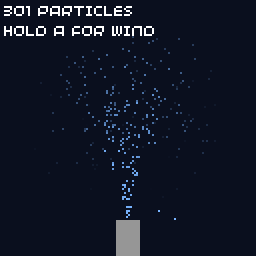
A ParticleGenerator manages a stream of particles: it creates them with your function, moves them, applies a constant force such as gravity, and removes them when they're too old.
// Particles: a fountain made with ParticleGenerator.
//
// A generator owns a list of particles. It creates new ones with your
// generate function, moves them by their velocity plus a constant force,
// and removes them when they are older than their lifetime. It aims to keep
// `count` particles alive, spread evenly over the lifetime.
#include "32blit.hpp"

using namespace blit;

Particle *new_drop() {
  // start at the nozzle with a random upward velocity (pixels per second)
  float spread = (float(blit::random() % 200) - 100.0f) / 100.0f;
  float speed = 90.0f + float(blit::random() % 40);
  return new Particle(Vec2(64, 110), Vec2(spread * 25.0f, -speed));
}

// up to 300 particles, each living 2 seconds
ParticleGenerator fountain(300, 2000, new_drop);

void init() {
  set_screen_mode(ScreenMode::hires);

  // gravity, in pixels per second per second
  fountain.force = Vec2(0, 90);
}

void update(uint32_t time) {
  // pass the current time: the generator works out the time since its last update
  fountain.update(time);

  // A blows the spray sideways while held
  fountain.force.x = (buttons & Button::A) ? 60.0f : 0.0f;
}

void render(uint32_t time) {
  screen.pen = Pen(10, 15, 30);
  screen.clear();

  for(auto p : fountain.particles) {
    // p->age goes from 0 (new) to 1 (about to be removed)
    screen.pen = Pen(120, 180, 255, int(255 * (1.0f - p->age)));
    screen.pixel(Point(p->pos));
  }

  screen.pen = Pen(150, 150, 150);
  screen.rectangle(Rect(58, 110, 12, 18));

  screen.pen = Pen(255, 255, 255);
  screen.text(std::to_string(fountain.particles.size()) + " particles", minimal_font, Point(2, 2));
  screen.text("Hold A for wind", minimal_font, Point(2, 12));
}
- The constructor takes how many particles to keep alive, how long each lives in milliseconds, and a function that returns a
new Particle(position, velocity). forceis added to every particle's velocity each second; setyfor gravity.- Call
update(time)with the current time every update. It works out how much time has passed since the last call itself. - Each particle has
pos,vel, andage(0 when new, 1 when about to be removed), which is handy for fading.
The generator spreads new particles evenly over the lifetime, so you get a steady stream, which suits fountains, smoke and engine trails. For a one-off burst, such as sparks when something explodes, a small std::vector of your own structs is simpler: see how Chili Catch does it.
One generator at a time
ParticleGenerator::update remembers the previous time in one variable shared by every generator. With two generators updated in the same step, the second sees no time pass and its particles freeze. Use a single generator, or your own particle list for the others. See Particles.
Try it
- Use a one-shot tween (loops
1) to slide a "LEVEL 2" banner in from the left. - Make the particle fountain change colour with
hsv_to_rgba()as particles age. - Use a timer with 3 loops for a "3, 2, 1, GO" countdown.
Next: tile maps.