Examples
Twelve small programs, each showing one part of the SDK. Every one builds for the desktop and for the VGC Zero, and the tutorials explain them. The source is in docs/examples.
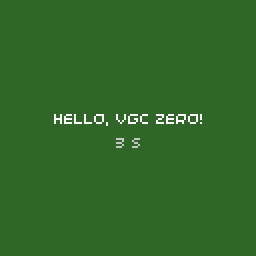
Hello World
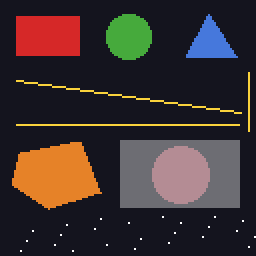
Shapes
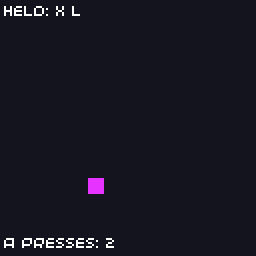
Input
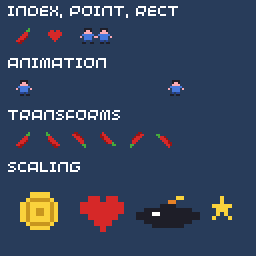
Sprites
Text
Audio
Saves
Timers and Tweens
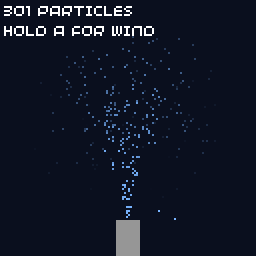
Particles
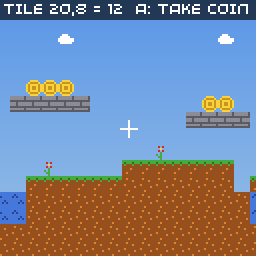
Tile Map
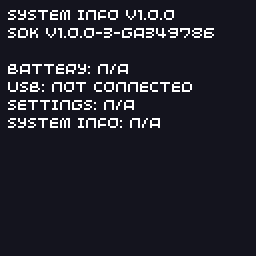
System Info
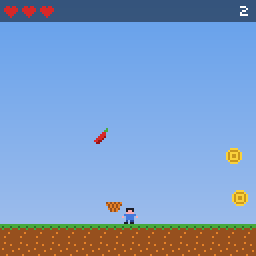
Chili Catch
Building them
cmake -B build.examples -S docs/examples
cmake --build build.examples
./build.examples/chili-catch/chili-catch
See building the examples for console builds.
The older and larger 32blit examples also build with this SDK. They were written for the 32blit's 320×240 screen, so most don't fit the VGC Zero's 128×128 one, but they are a good source of techniques. Some of them run in your browser.
Hello World
The smallest complete game: text and a colour cycle.
Explained in: the tutorial
hello-world.cpp
// Hello World: the smallest complete game.
//
// Every game provides three functions: init() runs once at start-up,
// update() runs 100 times a second to move the game on, and render()
// runs once per frame to draw it.
#include "32blit.hpp"

using namespace blit;

void init() {
  // 128x128 pixels, the full VGC Zero screen
  set_screen_mode(ScreenMode::hires);
}

void update(uint32_t time) {
  // nothing to update yet
}

void render(uint32_t time) {
  // fade the background through the colour wheel, one turn every 10 seconds
  float hue = (time % 10000) / 10000.0f;
  screen.pen = hsv_to_rgba(hue, 0.6f, 0.4f);
  screen.clear();

  screen.pen = Pen(255, 255, 255);
  screen.text("Hello, VGC Zero!", minimal_font, Point(64, 60), true, TextAlign::center_center);

  screen.pen = Pen(200, 200, 200);
  screen.text(std::to_string(time / 1000) + " s", minimal_font, Point(64, 72), true, TextAlign::center_center);
}
Shapes
Every drawing primitive: rectangles, circles, triangles, lines, polygons, pixels and transparency.
Explained in: the tutorial
shapes.cpp
// Shapes: every drawing primitive on one screen.
#include "32blit.hpp"

using namespace blit;

void init() {
  set_screen_mode(ScreenMode::hires);
}

void update(uint32_t time) {
}

void render(uint32_t time) {
  screen.pen = Pen(20, 20, 30);
  screen.clear();

  // filled rectangle
  screen.pen = Pen(214, 40, 40);
  screen.rectangle(Rect(8, 8, 32, 20));

  // circle, given a centre and a radius
  screen.pen = Pen(70, 170, 60);
  screen.circle(Point(64, 18), 11);

  // triangle
  screen.pen = Pen(70, 120, 220);
  screen.triangle(Point(92, 28), Point(104, 6), Point(118, 28));

  // lines, and fast horizontal and vertical spans
  screen.pen = Pen(250, 210, 60);
  screen.line(Point(8, 40), Point(120, 56));
  screen.h_span(Point(8, 62), 112);
  screen.v_span(Point(124, 36), 30);

  // polygon from a list of points
  screen.pen = Pen(230, 130, 40);
  screen.polygon({Point(10, 76), Point(40, 70), Point(50, 96), Point(24, 104), Point(6, 92)});

  // single pixels: a small starfield that drifts left
  screen.pen = Pen(255, 255, 255);
  for(int i = 0; i < 24; i++) {
    int x = (i * 37 + 128 - (time / 40) % 128) % 128;
    screen.pixel(Point(x, 108 + (i * 7) % 18));
  }

  // alpha: a translucent rectangle over the shapes underneath
  screen.pen = Pen(255, 255, 255, 96);
  screen.rectangle(Rect(60, 70, 60, 34));

  // global alpha fades everything drawn after it
  screen.alpha = 128;
  screen.pen = Pen(250, 170, 180);
  screen.circle(Point(90, 87), 14);
  screen.alpha = 255;
}
Input
Move a square with the d-pad, react to presses and releases, and list the held buttons.
Explained in: the tutorial
input.cpp
// Input: move a square with the d-pad and show which buttons are held.
#include "32blit.hpp"

using namespace blit;

Vec2 position(60, 60);
Pen colour(214, 40, 40);
int presses = 0;

void init() {
  set_screen_mode(ScreenMode::hires);
}

void update(uint32_t time) {
  // update() runs every 10 ms, so 0.5 pixels per update is 50 pixels a second
  const float speed = 0.5f;

  // held buttons: test the bits of `buttons`
  if(buttons & Button::DPAD_LEFT)  position.x -= speed;
  if(buttons & Button::DPAD_RIGHT) position.x += speed;
  if(buttons & Button::DPAD_UP)    position.y -= speed;
  if(buttons & Button::DPAD_DOWN)  position.y += speed;

  // keep the square on screen
  position.x = std::max(0.0f, std::min(position.x, 120.0f));
  position.y = std::max(12.0f, std::min(position.y, 120.0f));

  // buttons.pressed only holds buttons that went down since the last update,
  // so this runs once per press however long the button is held
  if(buttons.pressed & Button::A) {
    colour = hsv_to_rgba((blit::random() % 360) / 360.0f, 0.8f, 1.0f);
    presses++;
  }

  // buttons.released is the same for buttons that were let go
  if(buttons.released & Button::B)
    position = Vec2(60, 60);
}

void render(uint32_t time) {
  screen.pen = Pen(20, 20, 30);
  screen.clear();

  screen.pen = colour;
  screen.rectangle(Rect(Point(position), Size(8, 8)));

  // list the held buttons along the top
  static const struct { Button button; const char *name; } names[] = {
    {Button::A, "A"}, {Button::B, "B"}, {Button::X, "X"}, {Button::Y, "Y"},
    {Button::DPAD_UP, "U"}, {Button::DPAD_DOWN, "D"}, {Button::DPAD_LEFT, "L"}, {Button::DPAD_RIGHT, "R"},
    {Button::MENU, "MENU"},
  };

  std::string held;
  for(auto &n : names) {
    if(pressed(n.button))
      held += std::string(n.name) + " ";
  }

  screen.pen = Pen(255, 255, 255);
  screen.text("Held: " + held, minimal_font, Point(2, 2));
  screen.text("A presses: " + std::to_string(presses), minimal_font, Point(2, 118));
}
Sprites
Draw sprites by index, cell or block; animate them; flip, rotate and scale them.
Explained in: the tutorial
sprites.cpp
// Sprites: draw from a spritesheet, animate, flip, rotate and scale.
//
// The sheet is assets/sprites.png, a grid of 8x8 sprites packed into the
// game by assets.yml. Sprite 0 is the top-left one, counting along each row.
#include "32blit.hpp"
#include "assets.hpp"

using namespace blit;

// sprite indices in the sheet
enum Sprite : uint16_t {
  CHILI = 0, PLAYER_WALK_1 = 1, PLAYER_WALK_2 = 2, HEART = 3, COIN = 4, BOMB = 5, STAR = 6
};

void init() {
  set_screen_mode(ScreenMode::hires);

  // load the packed image into a surface and make it the active spritesheet
  screen.sprites = Surface::load(asset_sprites);
}

void update(uint32_t time) {
}

void render(uint32_t time) {
  screen.pen = Pen(40, 60, 90);
  screen.clear();

  screen.pen = Pen(255, 255, 255);
  screen.text("Index, Point, Rect", minimal_font, Point(4, 2));

  // three ways to pick a sprite: by index...
  screen.sprite(CHILI, Point(8, 14));
  // ...by its column and row in 8x8 units...
  screen.sprite(Point(3, 0), Point(24, 14));
  // ...or a block of several sprites as one (here 2x1 sprites wide)
  screen.sprite(Rect(1, 0, 2, 1), Point(40, 14));

  screen.text("Animation", minimal_font, Point(4, 28));
  // swap between two frames every 200 ms
  uint16_t frame = (time / 200) % 2 ? PLAYER_WALK_1 : PLAYER_WALK_2;
  screen.sprite(frame, Point(8, 40));

  // walk across the screen, flipping to face the direction of travel
  int t = (time / 16) % 200;
  int x = t < 100 ? t : 200 - t;
  screen.sprite(frame, Point(20 + x, 40), t < 100 ? SpriteTransform::NONE : SpriteTransform::HORIZONTAL);

  screen.text("Transforms", minimal_font, Point(4, 54));
  const SpriteTransform transforms[] = {
    SpriteTransform::NONE, SpriteTransform::HORIZONTAL, SpriteTransform::VERTICAL,
    SpriteTransform::R90, SpriteTransform::R180, SpriteTransform::R270
  };
  for(int i = 0; i < 6; i++)
    screen.sprite(CHILI, Point(8 + i * 14, 66), transforms[i]);

  screen.text("Scaling", minimal_font, Point(4, 80));
  // scale around the sprite's centre (origin 4,4) so it grows in place
  float scale = 1.0f + 1.5f * (0.5f + 0.5f * sinf(time / 300.0f));
  screen.sprite(COIN, Point(20, 106), Point(4, 4), scale);
  screen.sprite(HEART, Point(52, 106), Point(4, 4), 3.0f);
  screen.sprite(BOMB, Point(84, 106), Point(4, 4), Vec2(4.0f, 2.0f));
  screen.sprite(STAR, Point(112, 106), Point(4, 4), 2.0f);
}
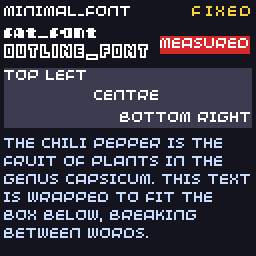
Text
The built-in fonts, fixed width, alignment, measuring and wrapping.
Explained in: the tutorial
text.cpp
// Text: built-in fonts, alignment, measuring and wrapping.
#include "32blit.hpp"

using namespace blit;

const std::string story =
  "The chili pepper is the fruit of plants in the genus Capsicum. "
  "This text is wrapped to fit the box below, breaking between words.";

void init() {
  set_screen_mode(ScreenMode::hires);
}

void update(uint32_t time) {
}

void render(uint32_t time) {
  screen.pen = Pen(20, 20, 30);
  screen.clear();

  // the three built-in fonts
  screen.pen = Pen(255, 255, 255);
  screen.text("minimal_font", minimal_font, Point(2, 2));
  screen.text("fat_font", fat_font, Point(2, 12));
  screen.text("outline_font", outline_font, Point(2, 22));

  // variable = false uses the fixed character width, like a terminal
  screen.pen = Pen(250, 210, 60);
  screen.text("fixed", minimal_font, Point(126, 2), false, TextAlign::top_right);

  // alignment inside a rectangle
  Rect box(2, 34, 124, 30);
  screen.pen = Pen(60, 60, 80);
  screen.rectangle(box);
  screen.pen = Pen(255, 255, 255);
  screen.text("top left", minimal_font, box, true, TextAlign::top_left);
  screen.text("centre", minimal_font, box, true, TextAlign::center_center);
  screen.text("bottom right", minimal_font, box, true, TextAlign::bottom_right);

  // measure text to draw a background exactly behind it
  std::string label = "measured";
  Size size = screen.measure_text(label, minimal_font);
  screen.pen = Pen(214, 40, 40);
  screen.rectangle(Rect(Point(80, 18), size));
  screen.pen = Pen(255, 255, 255);
  screen.text(label, minimal_font, Point(80, 18));

  // wrap long text to a width, then draw it as several lines
  Rect para(2, 68, 124, 58);
  std::string wrapped = screen.wrap_text(story, para.w, minimal_font);
  screen.pen = Pen(200, 220, 255);
  screen.text(wrapped, minimal_font, para);
}
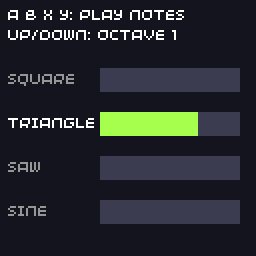
Audio
Four synth channels with different waveforms and envelopes, played from the buttons.
Explained in: the tutorial
audio.cpp
// Audio: play notes on the synth channels.
//
// A, B, X and Y each play a note with a different waveform. Up and down
// change the octave.
#include "32blit.hpp"

using namespace blit;

const char *wave_names[] = {"Square", "Triangle", "Saw", "Sine"};
int octave = 0;
int last_channel = -1;

void init() {
  set_screen_mode(ScreenMode::hires);

  // channel 0: a short square-wave beep
  channels[0].waveforms = Waveform::SQUARE;
  channels[0].attack_ms = 5;
  channels[0].decay_ms = 100;
  channels[0].sustain = 0;   // no sustain, so the note ends by itself
  channels[0].release_ms = 0;

  // channel 1: a soft triangle that holds while the button is held
  channels[1].waveforms = Waveform::TRIANGLE;
  channels[1].attack_ms = 30;
  channels[1].decay_ms = 200;
  channels[1].sustain = 0xafff;
  channels[1].release_ms = 300;

  // channel 2: a buzzy saw
  channels[2].waveforms = Waveform::SAW;
  channels[2].attack_ms = 10;
  channels[2].decay_ms = 300;
  channels[2].sustain = 0x7fff;
  channels[2].release_ms = 100;

  // channel 3: a sine with a long release, like a bell
  channels[3].waveforms = Waveform::SINE;
  channels[3].attack_ms = 2;
  channels[3].decay_ms = 600;
  channels[3].sustain = 0;
  channels[3].release_ms = 600;
}

void play(int channel, uint16_t frequency) {
  channels[channel].frequency = frequency << octave;
  channels[channel].trigger_attack();
  last_channel = channel;
}

void update(uint32_t time) {
  const Button keys[] = {Button::A, Button::B, Button::X, Button::Y};
  const uint16_t notes[] = {262, 330, 392, 523}; // C4, E4, G4, C5

  for(int i = 0; i < 4; i++) {
    if(buttons.pressed & keys[i])
      play(i, notes[i]);

    // letting go moves a held note on to its release
    if(buttons.released & keys[i])
      channels[i].trigger_release();
  }

  if(buttons.pressed & Button::DPAD_UP)   octave = std::min(octave + 1, 2);
  if(buttons.pressed & Button::DPAD_DOWN) octave = std::max(octave - 1, 0);
}

void render(uint32_t time) {
  screen.pen = Pen(20, 20, 30);
  screen.clear();

  screen.pen = Pen(255, 255, 255);
  screen.text("A B X Y: play notes", minimal_font, Point(4, 4));
  screen.text("Up/Down: octave " + std::to_string(octave), minimal_font, Point(4, 14));

  // one bar per channel showing its envelope level
  for(int i = 0; i < 4; i++) {
    int y = 34 + i * 22;
    // adsr is the envelope level, 24-bit
    int level = channels[i].adsr >> 18; // 0..63
    if(channels[i].adsr_phase == ADSRPhase::OFF)
      level = 0;

    screen.pen = Pen(60, 60, 80);
    screen.rectangle(Rect(50, y, 70, 12));
    screen.pen = hsv_to_rgba(i / 4.0f, 0.7f, 1.0f);
    screen.rectangle(Rect(50, y, level + 6 * (level > 0), 12));

    screen.pen = i == last_channel ? Pen(255, 255, 255) : Pen(150, 150, 150);
    screen.text(wave_names[i], minimal_font, Point(4, y + 2));
  }
}
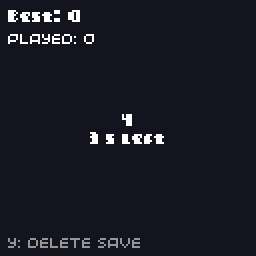
Saves
A five-second button-mashing game that keeps your best score with read_save, write_save and on_quit.
Explained in: the tutorial
saves.cpp
// Saves: keep a best score between sessions.
//
// Press A as many times as you can in 5 seconds. The best score is saved
// with write_save() and loaded again with read_save() the next time the
// game starts.
#include "32blit.hpp"

using namespace blit;

// Everything that is saved goes in one plain struct. Add a version number
// so a later build of the game can recognise (and upgrade) old saves.
struct SaveData {
  uint32_t version = 1;
  uint32_t best = 0;
  uint32_t games_played = 0;
};

SaveData save;

enum class State { ready, playing, done } state = State::ready;
uint32_t round_start = 0;
uint32_t score = 0;
bool new_best = false;

void save_now() {
  write_save(save);
}

void init() {
  set_screen_mode(ScreenMode::hires);

  // read_save() returns false when there is no save yet (or it is the wrong size)
  if(!read_save(save) || save.version != 1)
    save = SaveData();

  // called when the player quits to the home screen (or closes the window on desktop)
  on_quit = save_now;
}

void update(uint32_t time) {
  switch(state) {
    case State::ready:
      if(buttons.pressed & Button::A) {
        state = State::playing;
        round_start = time;
        score = 0;
      }
      break;

    case State::playing:
      if(buttons.pressed & Button::A)
        score++;

      if(time - round_start >= 5000) {
        state = State::done;
        save.games_played++;
        new_best = score > save.best;
        if(new_best)
          save.best = score;

        // save at the end of every round too: switching the console off can't be caught
        save_now();
      }
      break;

    case State::done:
      if(buttons.pressed & Button::A)
        state = State::ready;
      break;
  }

  // Y clears the save file
  if(buttons.pressed & Button::Y) {
    remove_save();
    save = SaveData();
  }
}

void render(uint32_t time) {
  screen.pen = Pen(20, 20, 30);
  screen.clear();

  screen.pen = Pen(255, 255, 255);
  screen.text("Best: " + std::to_string(save.best), fat_font, Point(4, 4));
  screen.text("Played: " + std::to_string(save.games_played), minimal_font, Point(4, 16));

  std::string message;
  switch(state) {
    case State::ready:
      message = "Press A to start";
      break;
    case State::playing:
      message = std::to_string(score) + "\n" + std::to_string(5 - (time - round_start) / 1000) + " s left";
      break;
    case State::done:
      message = "Score " + std::to_string(score) + (new_best ? "\nNew best!" : "") + "\nA: again";
      break;
  }
  screen.text(message, fat_font, Rect(0, 30, 128, 70), true, TextAlign::center_center);

  screen.pen = Pen(150, 150, 150);
  screen.text("Y: delete save", minimal_font, Point(4, 118));
}
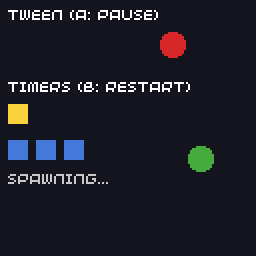
Timers and Tweens
Repeating and counted timers, and tweens that slide and bob.
Explained in: the tutorial
timers-tweens.cpp
// Timers and tweens.
//
// A Timer calls a function after a delay, optionally repeating. A Tween
// moves a value from one number to another over time along a curve. Both
// are updated by the engine, you only start them.
#include "32blit.hpp"

using namespace blit;

Timer blink_timer;
Timer spawn_timer;
Tween slide;
Tween bounce;

bool blink_on = true;
int spawned = 0;

void blink(Timer &timer) {
  blink_on = !blink_on;
}

void spawn(Timer &timer) {
  spawned++;
  // timer.loop_count counts how many times it has fired
}

void init() {
  set_screen_mode(ScreenMode::hires);

  // fire every 500 ms, forever (loops = -1)
  blink_timer.init(blink, 500, -1);
  blink_timer.start();

  // fire every second, five times, then stop
  spawn_timer.init(spawn, 1000, 5);
  spawn_timer.start();

  // 0 to 100 over 2 seconds, repeating
  slide.init(tween_ease_in_out_quad, 0.0f, 100.0f, 2000, -1);
  slide.start();

  // a sine wave between 20 and 60, one cycle per 1.5 seconds
  bounce.init(tween_sine, 20.0f, 60.0f, 1500, -1);
  bounce.start();
}

void update(uint32_t time) {
  // A pauses and resumes the slide
  if(buttons.pressed & Button::A) {
    if(slide.is_running())
      slide.pause();
    else
      slide.start();
  }

  // B restarts the spawn timer
  if(buttons.pressed & Button::B) {
    spawned = 0;
    spawn_timer.stop();
    spawn_timer.start();
  }
}

void render(uint32_t time) {
  screen.pen = Pen(20, 20, 30);
  screen.clear();

  screen.pen = Pen(255, 255, 255);
  screen.text("Tween (A: pause)", minimal_font, Point(4, 4));
  screen.pen = Pen(214, 40, 40);
  screen.circle(Point(14 + int(slide.value), 22), 6);

  screen.pen = Pen(70, 170, 60);
  screen.circle(Point(100, 30 + int(bounce.value)), 6);

  screen.pen = Pen(255, 255, 255);
  screen.text("Timers (B: restart)", minimal_font, Point(4, 40));
  if(blink_on) {
    screen.pen = Pen(250, 210, 60);
    screen.rectangle(Rect(4, 52, 10, 10));
  }

  screen.pen = Pen(70, 120, 220);
  for(int i = 0; i < spawned; i++)
    screen.rectangle(Rect(4 + i * 14, 70, 10, 10));

  screen.pen = Pen(200, 200, 200);
  screen.text(spawn_timer.is_finished() ? "spawn timer finished" : "spawning...", minimal_font, Point(4, 86));
}
Particles
A water fountain made with ParticleGenerator, with wind on A.
Explained in: the tutorial
particles.cpp
// Particles: a fountain made with ParticleGenerator.
//
// A generator owns a list of particles. It creates new ones with your
// generate function, moves them by their velocity plus a constant force,
// and removes them when they are older than their lifetime. It aims to keep
// `count` particles alive, spread evenly over the lifetime.
#include "32blit.hpp"

using namespace blit;

Particle *new_drop() {
  // start at the nozzle with a random upward velocity (pixels per second)
  float spread = (float(blit::random() % 200) - 100.0f) / 100.0f;
  float speed = 90.0f + float(blit::random() % 40);
  return new Particle(Vec2(64, 110), Vec2(spread * 25.0f, -speed));
}

// up to 300 particles, each living 2 seconds
ParticleGenerator fountain(300, 2000, new_drop);

void init() {
  set_screen_mode(ScreenMode::hires);

  // gravity, in pixels per second per second
  fountain.force = Vec2(0, 90);
}

void update(uint32_t time) {
  // pass the current time: the generator works out the time since its last update
  fountain.update(time);

  // A blows the spray sideways while held
  fountain.force.x = (buttons & Button::A) ? 60.0f : 0.0f;
}

void render(uint32_t time) {
  screen.pen = Pen(10, 15, 30);
  screen.clear();

  for(auto p : fountain.particles) {
    // p->age goes from 0 (new) to 1 (about to be removed)
    screen.pen = Pen(120, 180, 255, int(255 * (1.0f - p->age)));
    screen.pixel(Point(p->pos));
  }

  screen.pen = Pen(150, 150, 150);
  screen.rectangle(Rect(58, 110, 12, 18));

  screen.pen = Pen(255, 255, 255);
  screen.text(std::to_string(fountain.particles.size()) + " particles", minimal_font, Point(2, 2));
  screen.text("Hold A for wind", minimal_font, Point(2, 12));
}
Tile Map
A scrolling level built from text, with coins you can collect.
Explained in: the tutorial
tilemap.cpp
// Tile map: build a level from a spritesheet and scroll around it.
//
// A TileMap is a grid of sprite indices. Its width and height (in tiles)
// must be powers of two, and its spritesheet must be 128 pixels wide
// (16 sprites per row). Levels drawn in Tiled can be packed with
// assets.yml and loaded with TileMap::load_tmx() instead.
#include <cstring>

#include "32blit.hpp"
#include "assets.hpp"

using namespace blit;

// sprite indices in examples/shared/sprites.png
enum Tile : uint8_t {
  COIN = 4, GRASS = 8, DIRT = 9, BRICK = 10, WATER = 11, SKY = 12, FLOWER = 13, CLOUD = 15
};

constexpr int map_w = 32, map_h = 16; // in tiles, both powers of two

// The level as text, one character per tile. Easier to edit than numbers.
const char *level[map_h] = {
  "................................",
  "................................",
  "....c...........c.........c.....",
  "...........c....................",
  "................................",
  "..............$$$...............",
  ".............bbbbb.......$$.....",
  "........................bbbb....",
  ".....$$.........................",
  "....bbbb..............f.........",
  ".........f.....f....ggggggg.....",
  "gggggggggggg..ggggggddddddd.gggg",
  "ddddddddddddwwddddddddddddddwddd",
  "ddddddddddddwwddddddddddddddwddd",
  "dddddddddddddddddddddddddddddddd",
  "dddddddddddddddddddddddddddddddd",
};

uint8_t tiles[map_w * map_h];
TileMap *map = nullptr;
Surface *sheet = nullptr;

Vec2 camera(0, 0);

void init() {
  set_screen_mode(ScreenMode::hires);

  sheet = Surface::load(asset_sprites);
  screen.sprites = sheet;

  // turn the text into tile indices
  for(int y = 0; y < map_h; y++) {
    for(int x = 0; x < map_w; x++) {
      uint8_t t = SKY;
      switch(level[y][x]) {
        case 'g': t = GRASS; break;
        case 'd': t = DIRT; break;
        case 'b': t = BRICK; break;
        case 'w': t = WATER; break;
        case 'f': t = FLOWER; break;
        case 'c': t = CLOUD; break;
        case '$': t = COIN; break;
      }
      tiles[x + y * map_w] = t;
    }
  }

  // no per-tile transforms (nullptr), map size in tiles, and the spritesheet
  map = new TileMap(tiles, nullptr, Size(map_w, map_h), sheet);

  // SKY tiles are skipped when drawing, so the background shows through
  map->empty_tile_id = SKY;

  // wrap around horizontally when the camera goes past the edge
  map->repeat_mode = TileMap::REPEAT;
}

void update(uint32_t time) {
  if(buttons & Button::DPAD_LEFT)  camera.x -= 1.0f;
  if(buttons & Button::DPAD_RIGHT) camera.x += 1.0f;
  if(buttons & Button::DPAD_UP)    camera.y -= 1.0f;
  if(buttons & Button::DPAD_DOWN)  camera.y += 1.0f;

  camera.y = std::max(-32.0f, std::min(camera.y, float(map_h * 8 - 128)));

  // A collects the coin under the centre of the screen, if there is one
  if(buttons.pressed & Button::A) {
    Point centre = Point(camera + Vec2(64, 64)) / 8; // pixels to tiles
    int32_t index = map->offset(centre);
    if(index >= 0 && tiles[index] == COIN)
      tiles[index] = SKY;
  }
}

void render(uint32_t time) {
  // sky gradient behind the map
  for(int y = 0; y < 128; y++) {
    screen.pen = Pen(90 + y / 2, 150 + y / 3, 230);
    screen.h_span(Point(0, y), 128);
  }

  // the map's transform turns screen positions into map positions (in pixels),
  // so translating by the camera position scrolls the map
  map->transform = Mat3::translation(camera);
  map->draw(&screen, Rect(0, 0, 128, 128));

  // crosshair in the centre
  screen.pen = Pen(255, 255, 255);
  screen.h_span(Point(60, 64), 9);
  screen.v_span(Point(64, 60), 9);

  Point centre = Point(camera + Vec2(64, 64)) / 8;
  screen.pen = Pen(0, 0, 0, 160);
  screen.rectangle(Rect(0, 0, 128, 10));
  screen.pen = Pen(255, 255, 255);
  screen.text("tile " + std::to_string(centre.x) + "," + std::to_string(centre.y) +
              " = " + std::to_string(map->tile_at(centre)) + "  A: take coin", minimal_font, Point(2, 1));
}
System Info
Battery, USB, the player's settings and firmware details from the system API.
Explained in: System API
system-info.cpp
// System info: battery, USB, the player's settings and firmware details.
//
// These calls come from the console's firmware (the loader). On desktop
// builds, and on older firmware, they report "not available" instead.
#include <cstdio>

#include "32blit.hpp"

using namespace blit;

std::string kb(uint32_t bytes) {
  return std::to_string(bytes / 1024) + " KB";
}

void init() {
  set_screen_mode(ScreenMode::hires);
}

void update(uint32_t time) {
}

void render(uint32_t time) {
  screen.pen = Pen(20, 20, 30);
  screen.clear();

  std::string lines;

  // this game's own metadata.yml, and the SDK it was built with
  auto meta = get_metadata();
  lines += std::string(meta.title) + " " + meta.version + "\n";
  lines += std::string("SDK ") + get_version_string() + "\n\n";

  // battery: -1 means the device can't measure it
  int level = get_battery_level();
  if(level >= 0) {
    char buf[32];
    snprintf(buf, sizeof(buf), "Battery %d%% (%.2f V)", level, get_battery_voltage() / 1000.0);
    lines += std::string(buf) + "\n";
  } else {
    lines += "Battery: n/a\n";
  }
  lines += std::string("USB: ") + (is_usb_connected() ? "connected" : "not connected") + "\n";

  // brightness, volume and sleep are applied by the firmware; games can read them
  SystemSettings settings;
  if(get_system_settings(settings)) {
    lines += "Brightness " + std::to_string(settings.brightness) + "/15\n";
    lines += "Volume " + std::to_string(settings.volume) + "%\n";
    lines += "Sleep " + (settings.sleep_timeout ? std::to_string(settings.sleep_timeout / 60) + " min" : std::string("off")) + "\n";
  } else {
    lines += "Settings: n/a\n";
  }

  SystemInfo info;
  if(get_system_info(info)) {
    lines += std::string("FW ") + info.firmware_version + "\n";
    lines += "Games " + kb(info.app_flash_used) + "/" + kb(info.app_flash_total) + "\n";
    lines += "Drive free " + kb(info.storage_free) + "\n";
  } else {
    lines += "System info: n/a\n";
  }

  screen.pen = Pen(255, 255, 255);
  screen.text(lines, minimal_font, Point(4, 4));
}
Chili Catch
A complete game: catch chilis, dodge bombs, beat your best score.
Explained in: the tutorial
chili-catch.cpp
// Chili Catch: a complete small game.
//
// Move with the d-pad and catch the falling chilis. Coins are worth more,
// hearts give a life back, and bombs take one away. The game speeds up as
// the score grows, and the best score is saved.
//
// It brings together the pieces from the tutorials: the game loop, input,
// sprites, sound, saves, tweens and simple particles.
#include <vector>

#include "32blit.hpp"
#include "assets.hpp"

using namespace blit;

// ---------------------------------------------------------------------------
// constants

constexpr int screen_w = 128, screen_h = 128;
constexpr int ground_y = 112;      // top of the grass
constexpr float player_speed = 1.2f; // pixels per update (update runs 100 times a second)
constexpr int start_lives = 3, max_lives = 5;

// sprite indices in examples/shared/sprites.png
enum Sprite : uint16_t {
  CHILI = 0, PLAYER_1 = 1, PLAYER_2 = 2, HEART = 3, COIN = 4, BOMB = 5, STAR = 6, BASKET = 7, GRASS = 8, DIRT = 9
};

// ---------------------------------------------------------------------------
// game state

enum class State { title, playing, game_over };

struct Item {
  Sprite sprite;
  Vec2 pos;
  float speed;
};

struct Spark {
  Vec2 pos, vel;
  uint32_t born;
};

struct SaveData {
  uint32_t version = 1;
  uint32_t best = 0;
};

State state = State::title;
SaveData save;

float player_x = 60;
bool facing_left = false;
bool moving = false;

std::vector<Item> items;
std::vector<Spark> sparks;
uint32_t score = 0;
int lives = start_lives;
uint32_t next_spawn = 0;
uint32_t hurt_until = 0;   // flash the player after a bomb
bool new_best = false;

Tween title_bob;

// ---------------------------------------------------------------------------
// sound

void setup_sound() {
  // channel 0: pickup blip
  channels[0].waveforms = Waveform::SQUARE;
  channels[0].attack_ms = 2;
  channels[0].decay_ms = 80;
  channels[0].sustain = 0;
  channels[0].volume = 0x6000;

  // channel 1: bomb explosion
  channels[1].waveforms = Waveform::NOISE;
  channels[1].attack_ms = 5;
  channels[1].decay_ms = 400;
  channels[1].sustain = 0;

  // channel 2: game over / extra life tune
  channels[2].waveforms = Waveform::TRIANGLE;
  channels[2].attack_ms = 10;
  channels[2].decay_ms = 300;
  channels[2].sustain = 0;
}

void play(int channel, uint16_t frequency) {
  channels[channel].frequency = frequency;
  channels[channel].trigger_attack();
}

// ---------------------------------------------------------------------------
// helpers

void save_best() {
  write_save(save);
}

void burst(Vec2 pos, int count) {
  for(int i = 0; i < count; i++) {
    float angle = (blit::random() % 628) / 100.0f;
    float speed = 0.3f + (blit::random() % 100) / 100.0f;
    sparks.push_back({pos, Vec2(cosf(angle) * speed, sinf(angle) * speed - 0.5f), now()});
  }
}

void start_game(uint32_t time) {
  state = State::playing;
  items.clear();
  sparks.clear();
  score = 0;
  lives = start_lives;
  player_x = 60;
  next_spawn = time + 500;
  new_best = false;
}

void end_game() {
  state = State::game_over;
  new_best = score > save.best;
  if(new_best) {
    save.best = score;
    save_best();
  }
  play(2, 196);
}

void spawn_item(uint32_t time) {
  // pick what falls: mostly chilis, some coins and bombs, the odd heart
  int roll = blit::random() % 100;
  Sprite sprite = CHILI;
  if(roll >= 97) sprite = HEART;
  else if(roll >= 75) sprite = BOMB;
  else if(roll >= 63) sprite = COIN;

  // everything falls faster as the score goes up
  float speed = 0.35f + std::min<uint32_t>(score, 200) / 250.0f + (blit::random() % 30) / 100.0f;

  items.push_back({sprite, Vec2(float(4 + blit::random() % 116), -8.0f), speed});

  // and arrives more often
  uint32_t gap = 900 - std::min<uint32_t>(score * 4, 600);
  next_spawn = time + gap / 2 + blit::random() % gap;
}

// ---------------------------------------------------------------------------
// init / update / render

void init() {
  set_screen_mode(ScreenMode::hires);
  screen.sprites = Surface::load(asset_sprites);

  if(!read_save(save) || save.version != 1)
    save = SaveData();
  on_quit = save_best;

  setup_sound();

  title_bob.init(tween_sine, -3.0f, 3.0f, 1200, -1);
  title_bob.start();
}

void update_playing(uint32_t time) {
  moving = false;
  if(buttons & Button::DPAD_LEFT) {
    player_x -= player_speed;
    facing_left = true;
    moving = true;
  }
  if(buttons & Button::DPAD_RIGHT) {
    player_x += player_speed;
    facing_left = false;
    moving = true;
  }
  player_x = std::max(0.0f, std::min(player_x, float(screen_w - 16)));

  if(time >= next_spawn)
    spawn_item(time);

  // the basket is the 16 pixels in front of the player's hands
  Rect basket(int(player_x), ground_y - 14, 16, 6);

  for(auto it = items.begin(); it != items.end();) {
    it->pos.y += it->speed;

    Rect item_rect(Point(it->pos), Size(8, 8));
    bool caught = item_rect.intersects(basket);
    bool missed = it->pos.y > ground_y;

    if(caught) {
      switch(it->sprite) {
        case CHILI: score += 1; play(0, 880); break;
        case COIN:  score += 5; play(0, 1320); break;
        case HEART:
          lives = std::min(lives + 1, max_lives);
          play(2, 660);
          break;
        case BOMB:
          lives--;
          hurt_until = time + 600;
          play(1, 200);
          break;
        default: break;
      }
      burst(it->pos + Vec2(4, 4), it->sprite == BOMB ? 20 : 8);
    } else if(missed && it->sprite == CHILI) {
      // a dropped chili costs nothing, but gives a little puff
      burst(Vec2(it->pos.x + 4, ground_y), 3);
    }

    if(caught || missed)
      it = items.erase(it);
    else
      ++it;
  }

  if(lives <= 0)
    end_game();
}

void update(uint32_t time) {
  switch(state) {
    case State::title:
      if(buttons.pressed & Button::A)
        start_game(time);
      break;

    case State::playing:
      update_playing(time);
      break;

    case State::game_over:
      if(buttons.pressed & Button::A)
        start_game(time);
      break;
  }

  // sparks fly outwards, fall, and fade after 600 ms
  for(auto &s : sparks) {
    s.pos += s.vel;
    s.vel.y += 0.03f;
  }
  sparks.erase(std::remove_if(sparks.begin(), sparks.end(),
    [time](const Spark &s) { return time - s.born > 600; }), sparks.end());
}

void draw_background() {
  for(int y = 0; y < ground_y; y++) {
    screen.pen = Pen(100 + y / 2, 160 + y / 4, 235);
    screen.h_span(Point(0, y), screen_w);
  }
  for(int x = 0; x < screen_w; x += 8) {
    screen.sprite(GRASS, Point(x, ground_y));
    screen.sprite(DIRT, Point(x, ground_y + 8));
  }
}

void draw_hud() {
  screen.pen = Pen(0, 0, 0, 120);
  screen.rectangle(Rect(0, 0, screen_w, 11));

  for(int i = 0; i < lives; i++)
    screen.sprite(HEART, Point(2 + i * 9, 2));

  screen.pen = Pen(255, 255, 255);
  screen.text(std::to_string(score), minimal_font, Point(screen_w - 3, 2), true, TextAlign::top_right);
}

void draw_player(uint32_t time) {
  // flash while hurt
  if(time < hurt_until && (time / 80) % 2)
    return;

  uint16_t frame = moving && (time / 150) % 2 ? PLAYER_2 : PLAYER_1;
  uint8_t flip = facing_left ? SpriteTransform::HORIZONTAL : SpriteTransform::NONE;
  int x = int(player_x);

  // the player and the basket they hold out in front
  screen.sprite(frame, Point(facing_left ? x + 8 : x, ground_y - 8), flip);
  screen.sprite(BASKET, Point(facing_left ? x : x + 8, ground_y - 13));
}

void render(uint32_t time) {
  draw_background();

  for(auto &item : items)
    screen.sprite(item.sprite, Point(item.pos));

  if(state != State::title)
    draw_player(time);

  for(auto &s : sparks) {
    int age = time - s.born;
    screen.pen = Pen(255, 220, 80, 255 - age * 255 / 600);
    screen.pixel(Point(s.pos));
  }

  if(state == State::playing) {
    draw_hud();
    return;
  }

  // title and game over panels
  screen.pen = Pen(0, 0, 0, 150);
  screen.rectangle(Rect(10, 24, 108, 64));
  screen.pen = Pen(255, 255, 255);

  int bob = int(title_bob.value);
  if(state == State::title) {
    screen.sprite(CHILI, Point(56, 30 + bob), Point(4, 4), 2.0f);
    screen.text("CHILI CATCH", fat_font, Point(64, 48), true, TextAlign::center_center);
    screen.text("Best: " + std::to_string(save.best), minimal_font, Point(64, 62), true, TextAlign::center_center);
  } else {
    screen.text("GAME OVER", fat_font, Point(64, 36 + bob), true, TextAlign::center_center);
    screen.text("Score: " + std::to_string(score), minimal_font, Point(64, 54), true, TextAlign::center_center);
    screen.text(new_best ? "New best!" : "Best: " + std::to_string(save.best), minimal_font, Point(64, 64), true, TextAlign::center_center);
  }

  if((time / 500) % 2)
    screen.text("Press A", minimal_font, Point(64, 78), true, TextAlign::center_center);
}