2. Input
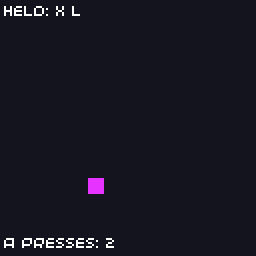
The VGC Zero has a d-pad and A, B, X, Y and MENU buttons. This lesson reads them three ways: held, just pressed, and just released.
// Input: move a square with the d-pad and show which buttons are held.
#include "32blit.hpp"

using namespace blit;

Vec2 position(60, 60);
Pen colour(214, 40, 40);
int presses = 0;

void init() {
  set_screen_mode(ScreenMode::hires);
}

void update(uint32_t time) {
  // update() runs every 10 ms, so 0.5 pixels per update is 50 pixels a second
  const float speed = 0.5f;

  // held buttons: test the bits of `buttons`
  if(buttons & Button::DPAD_LEFT)  position.x -= speed;
  if(buttons & Button::DPAD_RIGHT) position.x += speed;
  if(buttons & Button::DPAD_UP)    position.y -= speed;
  if(buttons & Button::DPAD_DOWN)  position.y += speed;

  // keep the square on screen
  position.x = std::max(0.0f, std::min(position.x, 120.0f));
  position.y = std::max(12.0f, std::min(position.y, 120.0f));

  // buttons.pressed only holds buttons that went down since the last update,
  // so this runs once per press however long the button is held
  if(buttons.pressed & Button::A) {
    colour = hsv_to_rgba((blit::random() % 360) / 360.0f, 0.8f, 1.0f);
    presses++;
  }

  // buttons.released is the same for buttons that were let go
  if(buttons.released & Button::B)
    position = Vec2(60, 60);
}

void render(uint32_t time) {
  screen.pen = Pen(20, 20, 30);
  screen.clear();

  screen.pen = colour;
  screen.rectangle(Rect(Point(position), Size(8, 8)));

  // list the held buttons along the top
  static const struct { Button button; const char *name; } names[] = {
    {Button::A, "A"}, {Button::B, "B"}, {Button::X, "X"}, {Button::Y, "Y"},
    {Button::DPAD_UP, "U"}, {Button::DPAD_DOWN, "D"}, {Button::DPAD_LEFT, "L"}, {Button::DPAD_RIGHT, "R"},
    {Button::MENU, "MENU"},
  };

  std::string held;
  for(auto &n : names) {
    if(pressed(n.button))
      held += std::string(n.name) + " ";
  }

  screen.pen = Pen(255, 255, 255);
  screen.text("Held: " + held, minimal_font, Point(2, 2));
  screen.text("A presses: " + std::to_string(presses), minimal_font, Point(2, 118));
}
Held buttons
buttons holds the state of every button as bits, one per Button. Test a bit with &:
This is true for every update while the button is held, so it's right for movement. pressed(Button::A) is the same test written as a function.
Test several buttons at once by combining them with |:
Pressed and released
For actions that should happen once per press, like jumping, firing or choosing a menu item, use buttons.pressed. It holds only the buttons that went down since the previous update:
buttons.released is the same for buttons that were let go. A charge-up attack might start on pressed and fire on released.
Read pressed and released in update()
They are worked out once per update, so in update() you see every press exactly once. In render() you might see the same press twice, or miss it, because render runs at a different rate.
Smooth movement
update() runs 100 times a second, so moving 0.5 pixels per update is 50 pixels a second. Pixels are whole numbers, but positions don't have to be: keep positions in a Vec2 (floats) and convert to a Point when you draw. That way slow speeds work too.
To move at the same speed diagonally, normalise the direction first:
Vec2 dir(0, 0);
if(buttons & Button::DPAD_LEFT)  dir.x -= 1;
if(buttons & Button::DPAD_RIGHT) dir.x += 1;
if(buttons & Button::DPAD_UP)    dir.y -= 1;
if(buttons & Button::DPAD_DOWN)  dir.y += 1;

if(dir.x != 0 || dir.y != 0) {
  dir.normalize();
  position += dir * speed;
}
Buttons the OS uses
On the console, HOME belongs to ChiliChip OS: a short press opens the system menu and holding it quits. Don't use it in your game. MENU is yours, and is the natural button for a pause menu.
Key repeat
For menus, it's nice when holding a direction keeps moving the selection. Track when the button went down and repeat after a delay:
uint32_t repeat_at = 0;

void update(uint32_t time) {
  if(buttons.pressed & Button::DPAD_DOWN) {
    select_next();
    repeat_at = time + 400;           // first repeat after 400 ms
  } else if((buttons & Button::DPAD_DOWN) && time >= repeat_at) {
    select_next();
    repeat_at = time + 100;           // then every 100 ms
  }
}
The built-in Menu class does this for you.
The LED
The console's status LED is on whenever LED is set to a colour that isn't black. You can use it as a notification light:
Try it
- Make B shrink the square and X grow it.
- Make the square wrap around the screen edges instead of stopping.
- Add an 8-way normalised movement as shown above, and compare how diagonals feel.
Next: sprites and assets.